Showing posts with label rhino. Show all posts

Thursday, May 29, 2014

Danielle Aras-Independent Project Process

These are some images of the process of making the Chicago Federal Building model.
 I did the initial 3-D model in Maya. Knowing the building was symmetrical, I made it as easy as possible on myself by only modeling one of each wall that was repeated more than once.

 The next step was to take the model into Pepakura and unfold it. I made two separate models, one for the base and one for the cupola. In this image, the colored pieces in the right window are all I needed to build the whole model.

After unfolding the model, I used Illustrator to add the cutout details and windows.
 This is what the files I sent to the laser cutter looked like...
And these are the pieces I got back, ready to be assembled. The final product can be seen in my other post.


Wednesday, May 28, 2014

Maria Barragan: PEPAKURA

PEPAKURA
Exploration of Pepakura fabrication technique. From Rhino (3D Object), to Tamasoftware (Flat Lines vector file of mountain and valley creases), to Illustrator (line adjustment), to Rhino ( laser cut file)


RHINO MODEL: Architectural Structural Model


PEPAKURA FABRICATED MODEL 


Sunday, March 16, 2014

Genna Williams: Wooden Sculpture

This form was created using Rhino, and after making a cardboard mock-up, the final sculpture was made from slices of eighth inch plywood and dowels.


To find out more about the process used to make this sculpture, check out my personal blog.

Thursday, March 13, 2014

Danielle Aras - Keyshot Images

I really enjoyed taking one of my Rhino models into Keyshot and seeing it in different materials so I figured I would share some of the images here. I started out with a couple different materials in a lighting environment I thought showcased the model well.

I also tried putting the object into an environment. I just used one of the default images in Keyshot but I really like the sort of industrial environment and think it would be an interesting site for a sculpture.
This last image is probably my favorite material, it was a copper mesh and I was able to adjust the scale of the mesh to make the piece semi-transparent. 
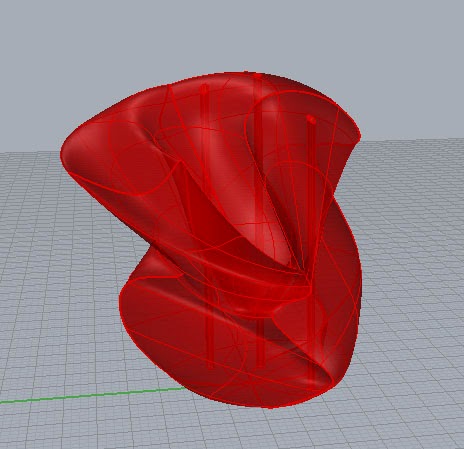
This is the original model in Rhino:

Danielle Aras - Pepakura Final

This is my final Pepakura piece. I modeled it in Maya then used Pepakura, Illustrator, and Rhino to create the layout for the laser cutter.
 This is the original model in Maya. The open windows were not originally part of the design but while putting the piece together I decided to leave out those pieces both for aesthetic reasons and to make it easier to put together.
This is basically what the layout of the cut file looked like (there are also some extra pieces that do not belong to this sculpture). I ended up leaving off the large base piece as well because it didn't really need it and it was much easier to put together with the bottom completely open.

Danielle Aras - Pepakura Studies

This is the first study I did leading up to the Pepakura project. I got the shape from the polyhedral models website.
This is what the cut file looked like after I had taken it through Illustrator and into Rhino:
For my second pepakura study, I started with a model in Maya and went through the workflow using Pepakura and Illustrator.
This is what the model and cut lines looked like in Pepakura:

Danielle Aras - Serial Slicing

This is my first serial sliced cardboard shape. I modeled it in Rhino and contoured the shape then labeled and laid it out manually.
This is what the Rhino model looked like:
For my second sculpture, I used the serial slicing script in Rhino. I had a problem with part of my model overlapping itself so a few of the slices didn't work properly, but I was able to use the contour tool to manually create the missing slices.
This is what the model looked like in Rhino:
This is what the dxf file I sent to be laser cut looked like:


Tuesday, October 8, 2013

Daniela Guarin Laser Cutting

For this project we had to chose a rhino model to create a sliced composition with cardboard. We could either worked with our previously scanned figure or we could try something new. I decided to try something spontaneous in rhino by adjusting the control points and moving the UVN. I came up with several little rhino sketches and I chose one that I liked to build my maquette from.

Rhino sketch with 5 coarse


Sectioning of the model.
After the computer files where exported into AutoCAD format DXF, I was ready for building.
The final result. Front

Back

Monday, September 30, 2013

Daniela Guarin 3D Scanning and Rendering

My inspiration for the model I did was Flamenco. The movement of the skirt and the pose that the dancer acquires while perfoming.


The result was an organic and light sculpture, that is delicate and dynamic.
This is the original sculptey model with the alignment dots 


This is my original scan, after I converted into an
OBJ file and export it from RapidWorks to Rhino.


View from the other side


I reduced the amount of polys in my model. This
was done in rapidworks. This one is a wireframe view of a 1000-poly
model
Same 1000-poly model in a ghosted view
This model have 5000 polys. Wireframe view
Later I exported the original model into keyshot to experiment with texture.
Model in Thread texture.
 Model in rust texture
Model in brass texture